Company Logo
VAT Entries in Tally UAE -GCC VAT Payments
Tally Solution

VAT Entries in Tally UAE -GCC VAT Payments

Morgan
Senior content writer
Thu Jan 22 2026
Get in touch with us
page
You can record a payment made to the GCC VAT authorities using a payment voucher. Other payments made to the authorities, such as interest and penalty, can also be recorded using this voucher - Tally UAE
1. Go to Gateway of Tally > Display > Statutory Reports > VAT > VAT 201 .
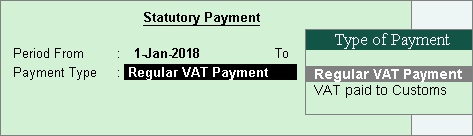
2. Click S : Stat Payment . In the Stat Payment Details screen.
3. Retain or change the Period From and To dates.
4. Select the Payment Type . The Stat Payment Details screen appears as shown below:
VAT Entries in Tally UAE
5. Accept the screen.
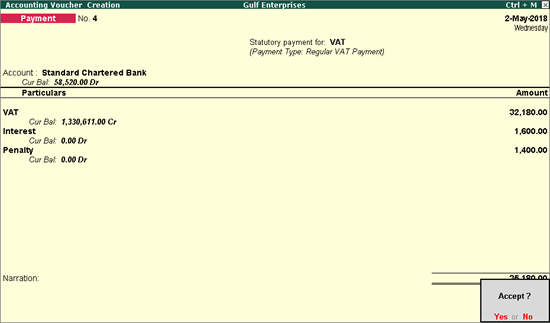
6. Select the bank ledger.
7. Select the VAT ledger. The payable amount appears automatically.
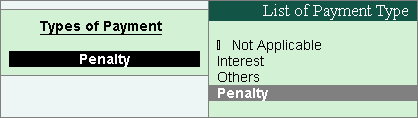
8. Select the other ledgers, as required. To make payments for interest or penalty, select the ledgers that were created to account for these dues. Ensure that these ledgers are grouped under Direct Expenses , Indirect Expenses , or Current Liabilities .
9. Select the type of payment to be made to the GCC VAT authorities.
VAT Entries in Tally
10. Enter relevant details in the Bank Allocations screen, and press Enter .
VAT Entries in Tally Dubai
11. Accept the voucher.
Similarly, you can record other tax payments to be made to the VAT authorities.

Related Articles

Explore more insights, ideas, and practical knowledge from our latest writings.
why-businesses-switch-odoo-partners
Accounting Software

Why Businesses Switch Odoo Partners and Never Look Back

Morgan09 Feb 2026
accounting-entries-guide
Accounting Software

Understanding Accounting Entries: A Comprehensive Guide

Alex09 Feb 2026
what-is-accrual-accounting
Accounting Software

Accrual Accounting Explained: Prepaid Expenses, Accruals and Deferrals

Sophia07 Feb 2026
what-is-a-proforma-invoice
Accounting Software

Proforma Invoice: Everything You Need to Know

Drew07 Feb 2026